Navigate Here: Projects > Browse Implementation Projects > select a Project > Click the Project Status tab > Click the Add icon
You can add a project status record for a project on the Add Project Status page.
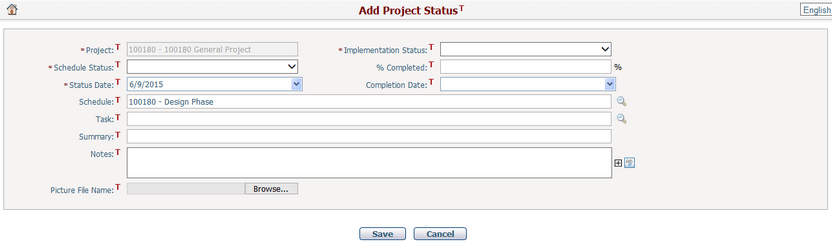
To add a project status record, fill in the following fields:
The required fields are noted with an asterisk (*).
Project*: The corresponding project's ID and name. It is read only.
Implementation Status*: The status of the project implementation. There are four statuses: In Construction, In Design, Pending/On-Hold, and Procurement.
Schedule Status*: The status of the project schedule. There are four statuses: Behind Schedule, Completed, On Hold, and On Schedule.
Percent Completed: It is the % of Completion field on the Manage Task page of the corresponding task.
Status Date*: The date when the task status was tracked.
Completion Date: The date when the task will be completed.
Schedule: Specify a schedule of the implementation project.
Task: Select a task to track its status. All tasks in the corresponding project schedule are listed for selection.
Summary: The overall summary of the project task status.
Notes: Description of the task status.
Picture File Name: Click the Browse button to browse and select a file to upload to the task. The picture size is limited to 1MB.
Click the Save button to save the new project status and the system will go to the Manage Project Status page.
Click the Cancel button to clear the latest input.